Food cost and margin: the exact formulas
Where the cost per serving, the food cost %, the margin and the suggested price come from, and what each color is telling you.
Updated on October 19, 2026
How does Miselup work out the cost of one serving?
Miselup adds up the cost of every line in the costing —ingredients (at gross weight when they have trim) and intermediate preparations— and spreads that total across the «Sale units» you declare on the recipe. That gives you the batch’s «Total cost» and the cost per sale unit, which the recipe shows as «Cost /» followed by your unit (serving, piece, glass…).
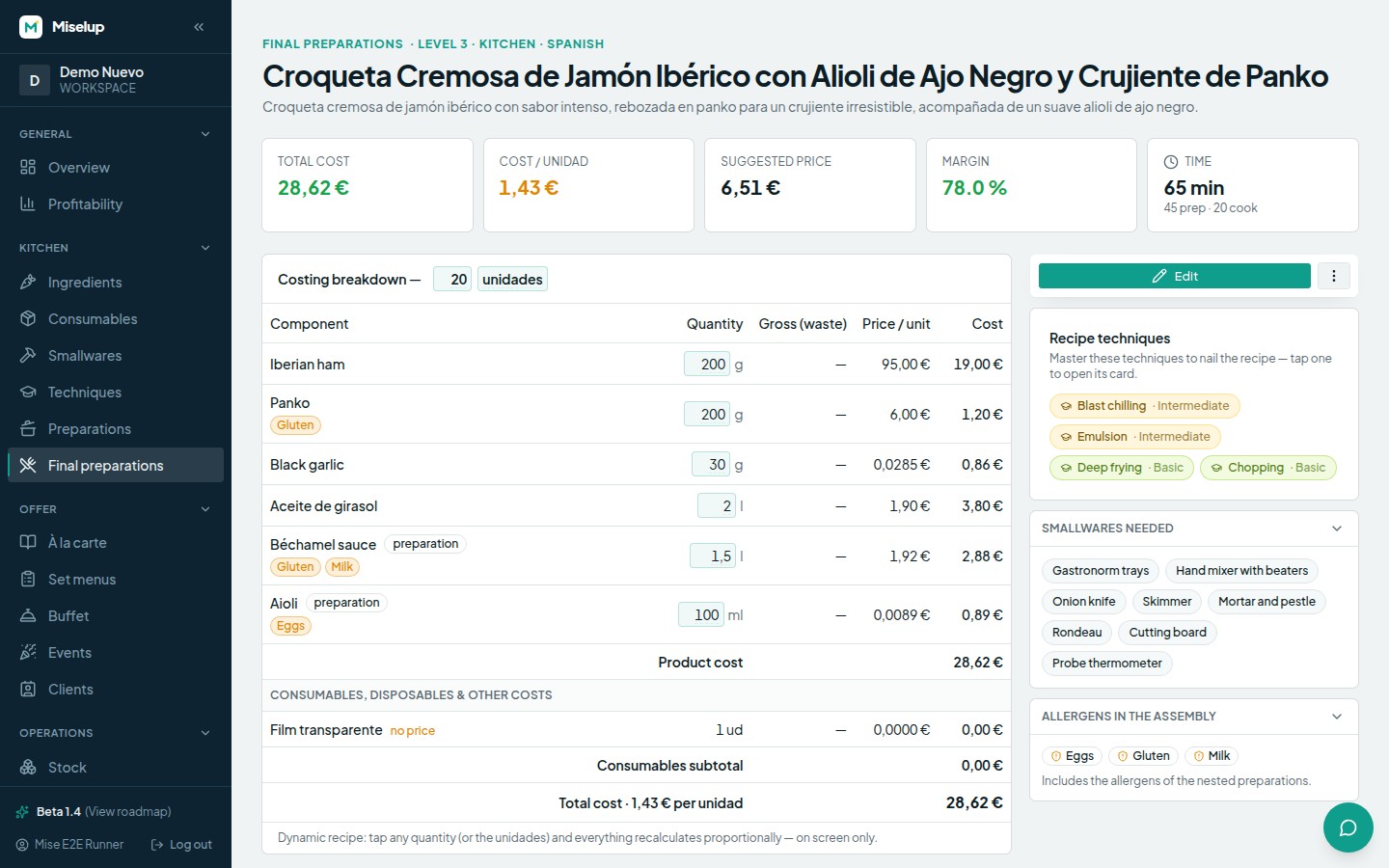
The recipe also splits two layers: «Product cost» (the raw material: ingredients and preparations) and the «Consumables subtotal» (the «Consumables, disposables & other costs» block: cling film, vacuum bags, packaging and free-text costs charged to the batch).
What is the food cost % and how is it calculated?
The food cost % is how much of every euro you charge goes on raw material:
food cost % = cost ÷ selling price × 100
Miselup calculates it on the product, not on the total cost: consumables are counted separately so that food cost means the same thing here as it does in the rest of the industry. That is why the recipe labels it «food cost on product» and consumables get their own line, «Consumables & costs».
What is the margin, and what price does Miselup suggest?
The margin in Miselup is margin on the selling price, not on cost:
margin % = (selling price − cost) ÷ selling price × 100
On the recipe you enter a «Target margin» and Miselup returns the «Suggested price» using the inverse formula:
suggested price = cost ÷ (1 − margin ÷ 100)
The recipe itself shows you the equivalence between the three ways of saying the same thing: «X% margin ≡ Y% food cost ≡ sell at ×Z cost». A 70% margin is a 30% food cost, and multiplying your cost by 3.3.
What do the food cost and margin colors mean?
They are two different traffic lights, and it pays not to mix them up.
In «Sale formats & prices», the food cost % is colored like this:
- Green — food cost up to 30%.
- Amber — food cost above 30% and up to 40%.
- Red — food cost above 40%.
In the «Profitability» block on the final preparation page, the bar and the wording judge the margin:
- 70% or more — «Excellent margin.»
- 60% or more — «Good margin.» (the bar is already green from 60%).
- 40% or more — «Acceptable margin — watch your costs.» (amber bar).
- Below 40% — «Low margin: review costs, waste or the selling price.» (red bar).
Are prices entered with or without VAT?
The whole of Miselup’s costing works net. Purchase prices are entered excluding VAT —the field says so literally: «Price (excl. VAT)», and the form’s helper insists with «as it appears on the invoice, excl. VAT»— and selling prices are handled on the same basis (the client price list spells it out: «Sale prices exclude VAT.»).
If you type a selling price with the VAT inside it, your margin and your food cost will look better than they really are. The place that turns gross into net is P&L management, which strips VAT out of sales to work out its percentages: /en/help/pnl-traffic-light/.
The free food cost calculator on the website does deduct VAT for you: see the calculators guide.
Is the costing margin my profit?
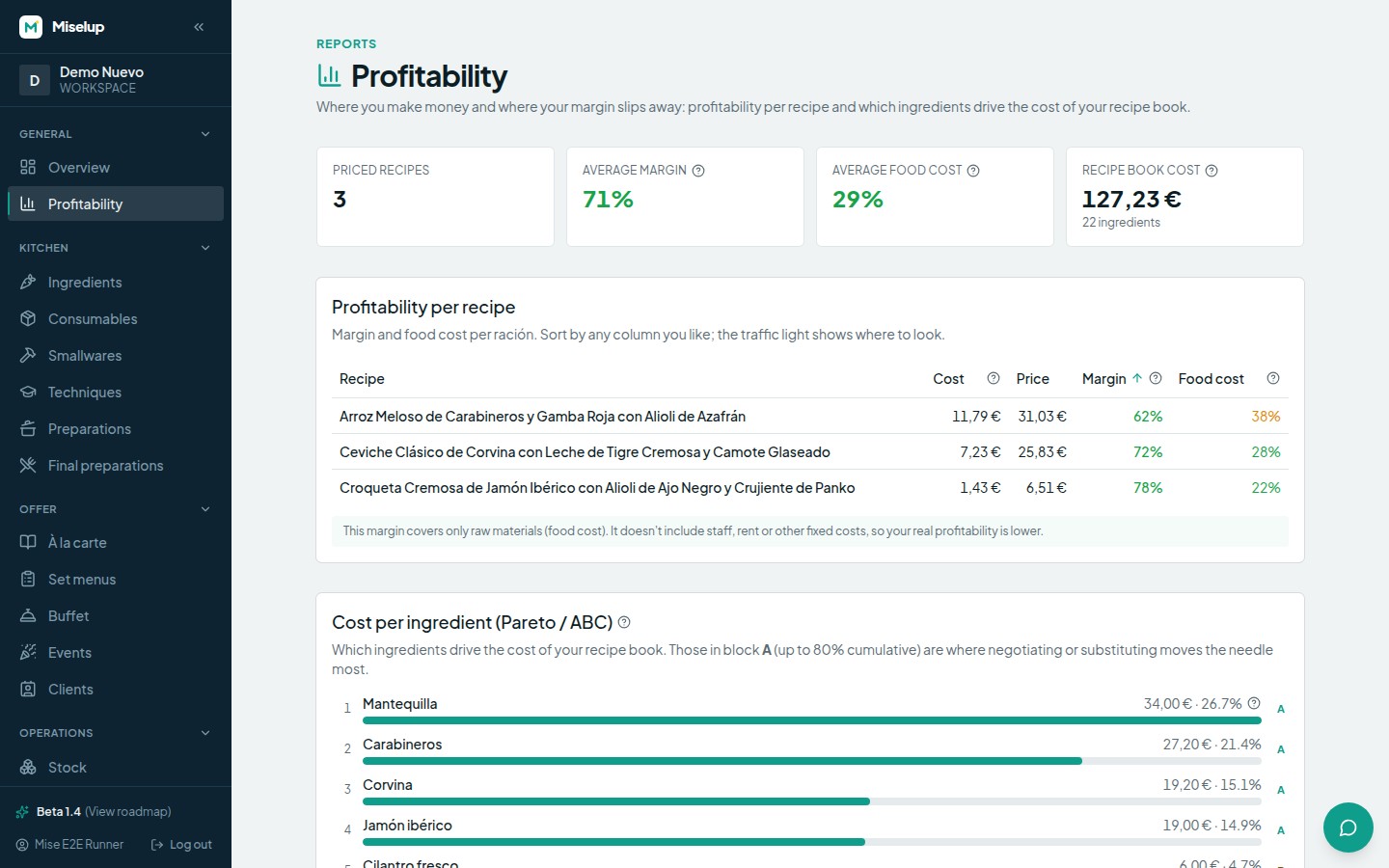
No, and Miselup warns you underneath the sale formats with this exact note: «This margin covers only raw materials (food cost). It doesn’t include staff, rent or other fixed costs, so your real profitability is lower.» Your real profitability only shows up once you deduct the operating cost of the business, and that lives in P&L management.
To compare active preparations and see which ingredients concentrate cost, read Profitability and Pareto.
To record packaging and distinguish cost contributions from working checklists, continue with consumables, techniques and smallwares.
Known limits
- The target margin accepts a maximum of 95%. Above that the suggested price would shoot up to nonsense.
- A line with no price enters the costing at 0.00 and the recipe flags it with «no price»: the real cost is higher than the one you see. The same goes for a preparation marked «cost not calculated».
- The market sets the selling price, not your cost: the app itself reminds you with «A cocktail that costs you little can sell for 10× its cost (or more) if that is its worth in your area.» Costing tells you whether that price makes you money, not what the price should be.
Was this article helpful?
Thanks! This helps us improve the help center.
Related articles
-
Creating an ingredient and setting its price
Add an ingredient, tell Miselup how you buy it (in bulk or by container) and it works out the cost per recipe unit.
-
Waste rates: from gross weight to net weight
Define the peel, the bones or the trim on each ingredient and your costing charges what you actually buy, not what you plate.
-
Intermediate preparations: sauces, stocks and doughs
Cost your sauce or your stock once and use it inside your final preparations: the cost per yield unit is inherited automatically.
-
The traffic light: reading the colors of your profitability
Green, amber or red: what each color means for food cost, margin and profit, and what to check every week.
Can't find what you're looking for?
Write to us and a real person from the team replies — no bots in the way when you need to talk.
Contact the team