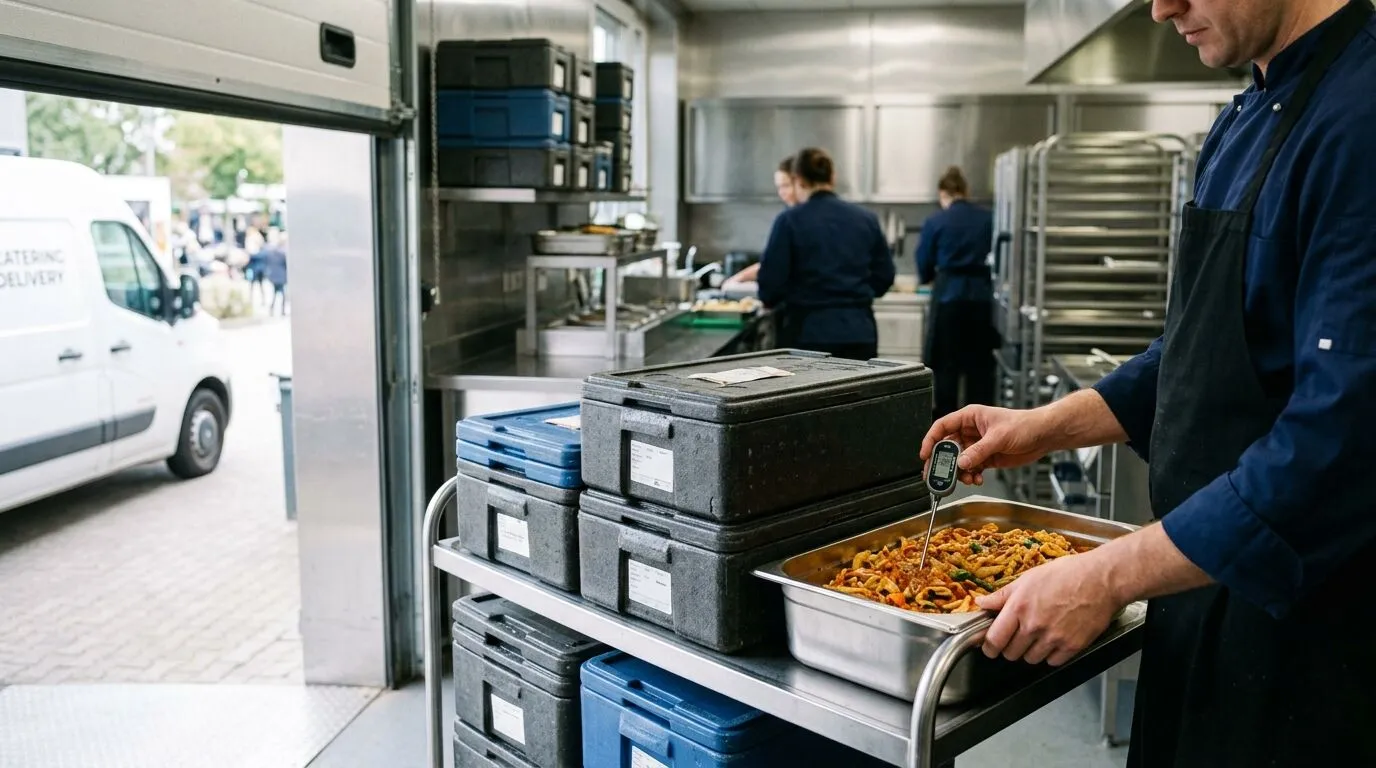
HACCP software for hospitality and catering, built for your production area
Prepare your manual, log checks and see what is missing in one place. The Mise Pro HACCP suite connects your quality manager’s work with the team’s mobile records.
Available in any country. Spain uses the Spanish legal catalog; every other country, including other EU countries, uses Codex Alimentarius and operator criteria. Miselup documents the system; it does not certify local legal compliance.
What Miselup covers and which businesses it serves
HACCP stands for Hazard Analysis and Critical Control Points. For chefs, quality managers and catering operators, the challenge is turning the plan into checks the team can carry out, review and document during service.
Miselup brings together the manual, hazard analysis, prerequisites, processes and record book. It helps restaurants, caterers, institutional kitchens, central production kitchens and bakeries organise their monitoring around the procedures each establishment declares.
In Spain, the product catalog draws on Regulation (EC) 852/2004 and applicable Spanish rules. The responsible person reviews the scope of the activity and completes the relevant criteria. Software documents that work; implementation also takes training and kitchen procedures.
Paper and Excel compared with Miselup in daily work
Task
Paper or Excel
Mise Pro HACCP
Manual and hazards
Keep templates, decisions and versions in separate files.
Draft with reasoned decisions, links to controls and the revision preserved at signing.
Shift checks
Review sheets and schedules to find missing entries.
Schedules and detected or declared obligations, with visible missing checks.
Deviations
Link measurements to criteria and the action taken.
Criterion kept with the reading, author and corrective action required where applicable.
Document preparation
Gather the manual and sheets for the period.
A/B/C report with pending items and read warnings to review before printing.
Your plan starts as a draft. In Spain, the catalog proposes hazards for the owner to assess, adopt or exclude with a reason. Under Codex, you declare your own hazards. Link adopted hazards to their controls and complete the responsible team, scope, intended use, process flow and on-site confirmation.
Review the exact manual before approval. Signing preserves that revision with the person’s name, date and edition. If the content changes while you review it, review it again before signing. Manuals signed before this format keep a scope note; they do not receive a hazard analysis that was never signed.
Pending items stay visible
The manual distinguishes items awaiting assessment, controls outside the available capture and activities without automatic detection. Approval with pending documentary items does not establish that the whole HACCP system is complete.
Changes keep their history
The signed manual is preserved. Permitted operational changes are documented; a profile change or reduced monitoring needs a new approved edition. Earlier records keep the criterion that applied when they were taken.
The manual decides what is monitored; the team checks it in the kitchen and records it.
Cooking, blast chilling, reheating, egg preparation, anisakis treatment and thawing have recording workflows. Each identifies the lot and portion. Depending on the procedure, record a single check or a start followed by a finish or abandonment with a reason. In two-act processes, starting leaves the obligation in progress; only the final act covers it.
The criteria below show the product’s ES scope and catalog references. In every other country, the operator declares limits, frequencies and windows under Codex. These Spanish figures are not presented as local law.
The cold cycle preserves the portion’s identity through treatment and thawing. Thawing that interrupts anisakis treatment prevents that treatment from being credited. Refreezing requires documented processing in the product workflow.
Cooking
ES criterion: Operator-declared temperature/time combination; no general legal threshold is preloaded.
Single check with lot, portion, core temperature and time at that temperature.
ES criterion: Hot prepared meals: core from 60 °C to 10 °C in <2 h, then reach the applicable storage temperature. Exactly 120 min fails the criterion.
Start and finish or abandonment, with endpoint temperatures and the recorded interval’s duration.
ES criterion: Core ≥74 °C for ≥15 s, within ≤1 h of removal from refrigeration. Discard unconsumed food; do not reheat or store it again.
Removal from refrigeration followed by finish or abandonment, with the fate of unconsumed food declared. Time out of refrigeration and holding time at temperature are separate.
ES criterion: ≥70 °C/≥2 s, or ≥63 °C/≥20 s for immediate consumption. Without that treatment, use egg products. Where art. 9.3 applies: ≤8 °C and consumption within ≤24 h of preparation.
Heat treatment, immediate consumption or egg-product route; storage follow-up where applicable.
ES criterion: Under refrigeration, avoiding contamination and contact with thaw drip. Justified technological exceptions or microwave/cold water followed by immediate cooking. No universal figure: operator criterion. Refreezing only after processing.
Start and finish or abandonment, declared route, contamination prevention and cold-cycle continuity.
Typed records cover cleaning and disinfection, pests, training, receiving, water and allergens, alongside product core temperature by lot. Caterers can record transport from loading to unloading and retention samples from origin to destination, with complete two-act workflows in both the dashboard and team portal. Container sanitising and service at destination also have records.
Where the plan has an applicable control, food purchase-order receipts and storage per produced food lot generate recording obligations. Receiving an order or producing a lot does not record a measurement. Take the measurement and link the record to its obligation; an overdue obligation without a record becomes a missing check.
Dispatches, services and thermal operations need activity declarations. Detection is not retrospective and does not cover every business movement. Failed detection is visible so you can review the object and declare the activity manually without blocking operations.
Cleaning and disinfection contact times are recorded and defined in minutes. Older records without a unit keep their value and print with a warning; they are not automatically treated as minutes.
Traceability and labels use inventory and recipes. Allergens are calculated from recorded ingredients and nested preparations. The label date comes from lot registration; it does not establish the packaging date or a net quantity per pack.
From start to destination
Unloading and the sample’s destination stay linked to the start, lot and linked obligation. Duration is calculated from observation times. Moving a sample does not restart its retention deadline.
Finish an older open process
An older open process can use the normal finish workflow when the necessary data is present. If its food family was missing, declare it at finish; the historical opening stays intact. The finish retains the criterion and verdict without inventing missing data.
In catering, every loading and unloading has its own reading: the route is documented end to end.
Schedule controls with frequencies, time windows and closed days. Due today helps organise the shift and shows overdue checks. The first draft displays missing checks without emailing about them. While a successor is being prepared, the current edition stays in force until the new one is approved.
Digital HACCP records keep observation and recording times separately. Deferred checks are identified within the allowance for that record type. Mistakes are voided with a reason and remain visible; earlier entries are not erased.
The owner or administrator can explain a missing check with a reason, author and date. It remains NOT performed with a subsequent explanation, and the count does not fall. Equipment breakdowns also explain affected gaps: declaration and repair stay in the history, only their overdue-check emails are muted, and deviation alerts remain.
A book that records what happened
An explanation, breakdown or started process is not a completed check. The screen and period report retain that distinction.
What is due today, what was done and what was missed, in a single log that is never rewritten.
06 · HACCP in your business
Your team records from the kitchen
Share the portal URL or QR code. Each person signs in with a four-digit PIN on a phone or tablet, reads the authorised recipes and records configured checks and the six available processes. The record keeps their identity. The portal receives no business prices or costs.
The responsible person defines criteria and the manual in management; the team works with configured controls. Points awaiting definition are identified so the kitchen knows whom to contact.
The portal shows open receiving and lot-storage obligations for its authorised controls. The team selects the obligation when recording and covers it with the final act; starting a two-act process leaves it in progress. Plan management and subsequent gap explanations are in the dashboard; explanations also appear in the report.
Kitchen access through the portal URL or QR and a personal PIN.
View configured checks, record measurements and document corrective actions in the team portal.
Controls in the portal
Controls in the portal
Configured controls, reading status and access to the form. Documentary records needing attachments are entered in management.
Measurement and corrective action
Measurement and corrective action
Product core-temperature recording and corrective action for deviations; this recording type is available in Mise Pro HACCP.
Controls in the portal
Controls in the portal
Configured controls, reading status and access to the form. Documentary records needing attachments are entered in management.
Measurement and corrective action
Measurement and corrective action
Product core-temperature recording and corrective action for deviations; this recording type is available in Mise Pro HACCP.
Controls in the portal
Controls in the portal
Configured controls, reading status and access to the form. Documentary records needing attachments are entered in management.
Measurement and corrective action
Measurement and corrective action
Product core-temperature recording and corrective action for deviations; this recording type is available in Mise Pro HACCP.
07 · HACCP in your business
Verification and the basis for your criteria
Document procedures and results for probe, system and CCP verification and traceability tests, at the frequency declared by the owner. Validation evidence can also be declared. Recording a review does not automatically validate the entire system.
In Spain, applicable limits are linked to hazards adopted at active points. Where two applicable figures overlap, the stricter one is used and the other reference is kept. Discrepancies are shown; the system does not decide which hazards the operator should adopt.
Where the catalog sets no figure, the establishment declares its criterion and basis. An operator criterion cannot weaken an applicable legal figure. Outside Spain, plan criteria and windows are operator declarations under Codex.
08 · HACCP in your business
Alerts and communication history
Temperature deviation emails also cover Mise Pro. History and preferences are not exclusive to Mise Pro HACCP: the owner or administrator chooses 1 to 10 active members who have accepted their invitation as recipients. Optional alerts can be muted; mandatory deviations are always kept. Without current payment or a recipient, the communication appears as blocked in the history.
Email is processed periodically. The history shows communication outcomes, retries and uncertain results needing reconciliation. Acceptance by the email provider does not prove the message reached an inbox.
Email supports kitchen monitoring. Check the record book and Due today for the control’s status. These alerts currently have no SMS, WhatsApp or push channel.
09 · HACCP in your business
Prepare your report for an inspection
The report has three blocks: A, the manual sealed at signing; B, changes and operational status; C, the book for the selected period. It includes criteria and citations, corrective actions, authors, dates, missing checks, explanations and voided entries. Pending plan items remain visible.
Print or save as PDF through the browser. Before sharing, check incomplete-read and truncation warnings and shorten the period where needed. A dedicated PDF with pagination and identification on each page is not yet available.
CSV from the temperature screen downloads those readings when present; it does not export the whole typed book. Lot details, labels and attachments are reviewed separately. The report helps organise documents but does not guarantee an inspection outcome.
Review the period, pending items and read warnings before sharing the documents.
Mise Pro includes temperature logging for cold equipment and hot-holding units, with reports. Mise Pro can also receive temperature deviation emails; history and preferences are available to the owner or administrator. Choose Mise Pro HACCP for the manual, typed record book and six processes; it includes everything in Mise Pro.
Create an account, choose a plan and prepare your establishment’s information. A first reading and a complete rollout are different milestones: hazards, procedures, responsible people and criteria need review before the HACCP system can be considered complete.
The MCP connector complements the app: manage equipment and temperatures, create drafts and editions, assign responsible people, declare criteria and windows, expand controls, record supported form types and read the book, gaps and open processes. Complete the six CCP, transport and retention-sample workflows in the dashboard or portal; MCP does not have full parity. Use the dashboard for verification, alert settings and event-obligation declarations. MCP attachment links do not have the managed storage of a file uploaded through the app.
HACCP by plan · monthly price per location, excluding VAT
HACCP capability
Mise Pro€49 / month
Mise Pro HACCP€79 / month
Cold-equipment and hot-holding temperatures; report
Included
Included
Inventory, lots, FEFO and labels with calculated allergens
Included
Included
Manual, hazard analysis and signed revision
Not included
Included
Typed book, prerequisites and core temperature by lot
Not included
Included
Six processes and catering records
Not included
Included; complete two-act transport and retention-sample workflows
Schedules, missing checks, explanations and breakdowns
Not included
Included
System and control verification
Not included
Included
Temperature deviation emails, subject to sending conditions
Included
Included
Alert history and preferences
Owner or administrator
Owner or administrator
Management users besides the owner
2
5
Kitchen portal via URL/QR and PIN
Temperatures according to access
Checks, processes and links to authorised open obligations
Prices exclude VAT. Spain: +21% VAT. In other countries, Stripe calculates and displays the applicable tax at checkout.
Questions for kitchen, quality and management teams to resolve before implementation.
In which countries can I use Miselup for HACCP?
In any country. Spanish plans use the Spanish legal catalog. Every other country, including the rest of the EU, uses Codex Alimentarius CXC 1-1969, rev. 2020, and operator criteria. Review the law applicable to your establishment; Miselup does not certify local legal compliance. Coming soon in the country selector refers to country-specific content, not product availability.
Do I need connected sensors or thermometers?
No connected hardware is required. Measure with the appropriate instrument and record on a phone, tablet or computer. Miselup does not receive sensor readings or automatically monitor the equipment’s physical temperature.
What does signing the HACCP manual preserve?
The owner or administrator approves it, identifying the individual who signs. Their name, date, edition and exact reviewed content are preserved. If their name matches the business name, they must confirm they are signing as a person. Signing does not remove pending documentary items.
What can I prepare for an inspection?
The sealed manual, changes and period book, with criteria, citations, corrective actions, authors, missing checks and voided entries. Review pending items and read warnings before printing or saving as PDF in the browser. Lot details and attachments are reviewed separately. The report does not guarantee an inspection outcome.
Does it support catering and institutional kitchens?
Yes. Mise Pro HACCP includes the six processes, retention-sample records, transport, container sanitising and service at destination, according to the plan. Transport has loading and unloading acts; retention samples have origin and destination acts. Both workflows can be completed in the dashboard or portal, preserving the link to the start and its criteria. Dispatches, services and thermal operations require activity declarations; receiving or producing is not the same as measuring.
Can the team record checks without seeing costs?
Yes. Open the portal by URL or QR and sign in with a four-digit PIN. It records configured checks and processes with their author, without receiving financial data. The team sees open receiving and lot-storage obligations for authorised controls and can link them when recording. Only the final act covers the obligation; starting a two-act process leaves it in progress. The portal does not provide plan management or process abandonment.
What happens when a HACCP record is missing?
A missing check appears when an applicable control becomes overdue without a record. The owner or administrator can explain it with a reason, author and date, but it remains NOT performed and the count does not fall. For two-act processes, starting does not cover the obligation: finish or abandon the process, with its verdict retained.
Does a fridge breakdown erase missing checks?
The history keeps the declared equipment breakdown and repair with their reasons. Affected gaps are explained without becoming completed checks. Only their overdue emails are muted, not deviations. After more than seven days, a notice asks you to review the breakdown’s status.
Can I export the book and manual?
Print the report or save it as PDF through the browser. Resolve read errors or narrow the period if truncated before sharing. Temperature CSV downloads only those readings when present, not the whole typed book. A dedicated paginated PDF with identification on each page and a complete book exporter are not yet available.
Can I manage several locations in one account?
Each account currently works with one establishment and its plan. Native multi-location management is pending. For several production sites, review the scope with Miselup before subscribing.
What is the HACCP difference between Mise Pro and Mise Pro HACCP?
Mise Pro includes cold-equipment and hot-holding temperature logs and reports, alongside inventory and traceability. Mise Pro HACCP includes everything in Mise Pro plus the manual, hazard analysis, typed book, prerequisites, processes, catering records and verification. Mise Pro also receives temperature deviation emails, and the owner or administrator can view history and configure alerts. Current prices are shown in this page’s table and on Pricing.
What happens when I change a plan or its criteria?
Earlier records keep the criterion in force when taken. A signed manual is not rewritten; changes requiring a new edition are reviewed and approved in that edition. Open processes must be finished or abandoned before approving a successor. Changing the account country does not alter a signed manual’s jurisdiction.
Do labels check every allergen?
They calculate allergens from recorded ingredients and nested preparations. They do not check supplier declarations or cross-contact. The printed date comes from lot registration, and the lot quantity does not establish net quantity per pack. Review the information before using the label.
Which alerts does Mise Pro receive, and what does sending depend on?
Mise Pro can receive temperature deviation emails. Sending requires an eligible subscription and a valid recipient; it is processed periodically, with retries where needed. The owner or administrator can configure recipients and view history. Provider acceptance does not guarantee inbox delivery. Mise Pro HACCP adds its suite’s controls and processes, with their deviations and optional alerts.
Who sets the frequency of temperature checks?
The responsible person declares it in the plan according to the equipment, food and activity. In Spain, applicable legal figures come from the product catalog; not every control has a fixed legal frequency. Elsewhere, limits, frequencies and windows are operator criteria under Codex. Blog tables are illustrative references.
Start organising your business’s HACCP
Prepare your equipment, procedures and responsible people. Follow the setup guide or discuss the scope for your restaurant, catering operation or institutional kitchen.
We use cookies and technical storage to make the site work and to remember your preferences. You can accept them or reject non-essential ones. More info