À la carte, set menus and buffets: costing your whole offering
Build your offering by section on top of your final preparations and see the cost, food cost and margin of every dish and of the whole thing.
Updated on September 3, 2026
À la carte, set menu or buffet: which one do I need?
Under the Offer group in the sidebar you have three ways of building what you sell, and all three sit on top of your already-costed final preparations:
- À la carte — every dish carries its own price. You see the food cost and the margin dish by dish, plus the menu’s total cost and average margin.
- Set menus — a fixed menu with a package price: the diner pays a single price for the whole thing. You see the set menu’s total cost, food cost and margin.
- Buffet — built by tray: you say how much of each dish you need and the cost per guest comes out on its own, overproduction included.
To quote a catering event you need a set menu or a buffet: an à la carte menu brings no cost per guest.
How do I build the sections and the dishes?
Building works exactly the same in à la carte menus, set menus and buffets:
- Go into Offer → À la carte, Offer → Set menus or Offer → Buffet and press the create button («New menu», «New set menu» or «New buffet»).
- Fill in Name, Description and Status (draft, active or archived) and, if you need it, the validity window with «Valid from» and «Valid until».
- Under «Sections and dishes» press «Add section» and name it (Starter, Main, Dessert…).
- Inside each section, «Add dish» and search for the final preparation you want to bring in.
- Repeat section by section until the offering is complete.
Where do I see the offering’s cost and margin?
Each offering carries its own cost breakdown block:
- On an à la carte menu, the «Menu cost breakdown» gives you Total cost, Average margin, number of Dishes and how many are Priced. In the table, each dish shows its Price, its Food cost and its Margin, with a suggested price if you haven’t set yours yet.
- On a set menu, the «Set menu cost breakdown» adds up Dishes, Total cost, Menu price, Food cost and Margin. You set the price under «Menu price (per cover)».
- On a buffet, the «Buffet cost breakdown» breaks out Dishes cost, Overproduction, Total cost, Cost per guest, Price per guest, Food cost and Margin.
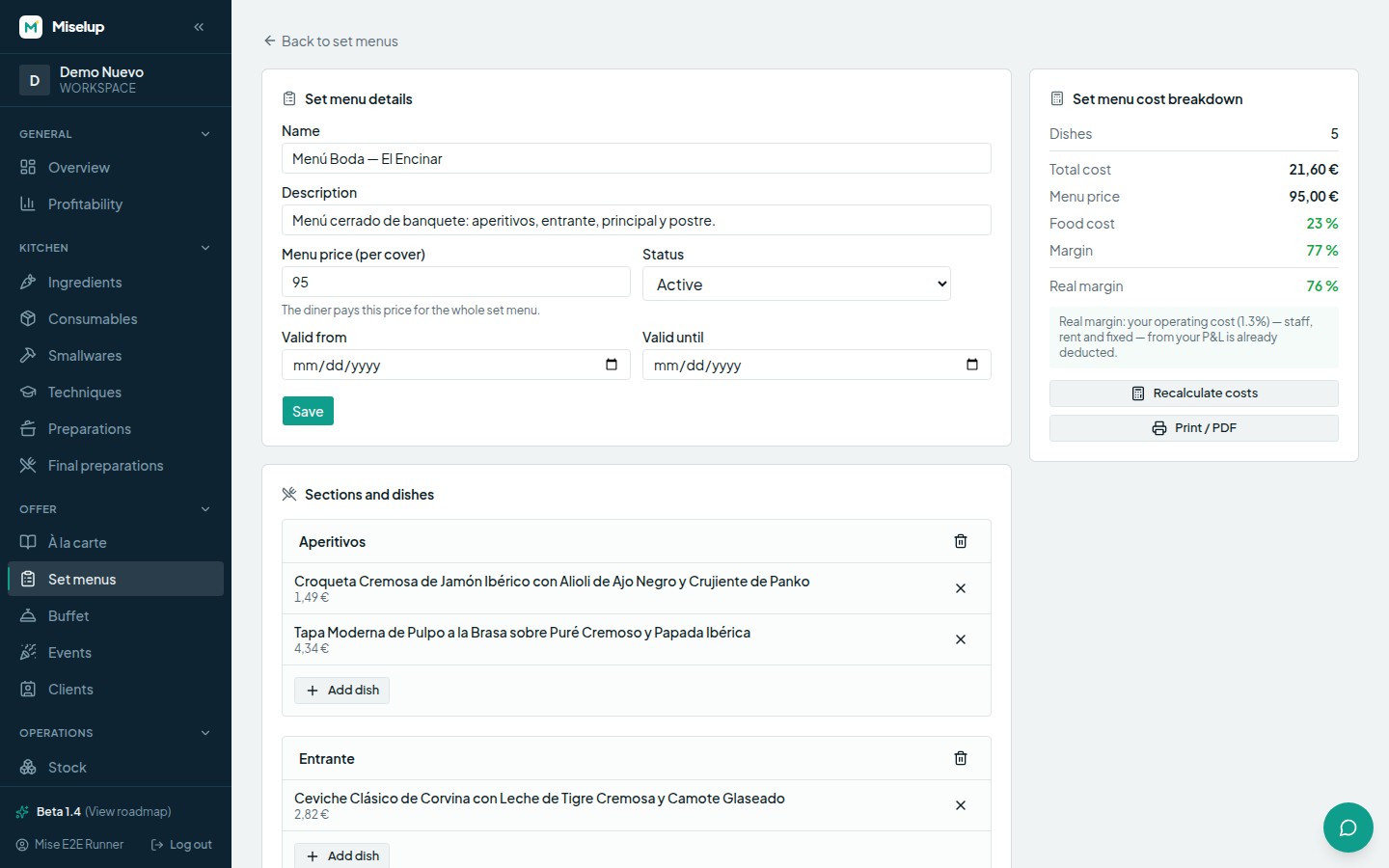
If you’ve touched ingredient prices after building the offering, press «Recalculate costs» to refresh it.
How is a buffet’s cost per guest worked out?
In the Buffet details you fill in «Guests (pax)» —the people you’re preparing the buffet for— and the «Overproduction (%)», the extra you produce so it doesn’t run out. Then, on each dish, you set the target quantity, its unit and, if you work with gastronorm, the tray size. With that, Miselup spreads the total cost across the guests.
If a dish has no declared yield or its units aren’t compatible, you’ll see the warning «No yield or incompatible units: set the cost manually.» and you’ll be able to type a manual cost for that line. The summary tells you how many dishes are still without a cost.
Can I show the menu to the customer?
Yes, and without exposing your numbers. On an à la carte menu, the «Share» button generates a public link you can send over WhatsApp or turn into a QR code for the table. You have two switches: «Show prices» (turn it off and the menu shows without prices) and «Visible to search engines». The link can be revoked whenever you want. The public menu never shows your costs or your margins.
À la carte menus and set menus also have «Print / PDF» so you can take the printed document with you.
Known limits
- Only final preparations go into sections: if a dish doesn’t exist yet as a final preparation, create it first.
- An à la carte menu has no cost per guest, so it doesn’t work as a costable offering for a catering event.
- On a buffet, dishes with no yield or with incompatible units need a manual cost; until then they count as dishes without a cost.
- The margin you see on à la carte menus, set menus and buffets covers raw materials only (food cost): it doesn’t include staff, rent or other fixed costs, so your real profitability is lower. For the real margin, use P&L management.
- Archiving an à la carte menu, a set menu or a buffet only takes it out of the list: no dish and no data is deleted.
Was this article helpful?
Thanks! This helps us improve the help center.
Related articles
-
Creating a catering event and giving it a food offering
Add an event, set the guest count and a food offering, and Miselup works out the cost, the price and the margin of the quote.
-
Food cost and margin: the exact formulas
Where the cost per serving, the food cost %, the margin and the suggested price come from, and what each color is telling you.
-
The spec sheet: photo, steps, smallwares and techniques
Turn the costing into the sheet your kitchen actually uses: main image, videos, method, plating, smallwares and techniques.
Can't find what you're looking for?
Write to us and a real person from the team replies — no bots in the way when you need to talk.
Contact the team