Closing the day: sales, expenses and real profit
Enter the day's sales and expenses in P&L management and see straight away whether the day made you a profit or a loss.
Updated on September 3, 2026
Where do I close the day in Miselup?
Under P&L management → Dashboard, with the «Close the day» button. P&L management is the module that carries your daily sales and expenses all the way to your real monthly profit — not just food cost. The full P&L (monthly matrix, budget, history and monthly break-even) is on the Mise Pro plan; on the plans below it you’ll see a taste of it with «Today», the daily break-even and the «Close the day» button itself, which you can use. Compare plans at miselup.pro/en/pricing.
How do I enter a day’s sales?
- Press «Close the day» under P&L management → Dashboard.
- Choose the «Date» (today by default, if you’re in the current month).
- Type in «Cash» and «Card». These are daily totals with taxes included: if you’ve set a default tax, Miselup deducts it to work out the net.
- Type in the day’s «Guests».
- Check the «Day’s sales» box, which updates as you type and also shows you the «Avg. ticket».
- Press «Save».
How do I add the day’s expenses?
In the same panel, under «Today’s expenses (optional)». Each expense is three things: the «Block» it belongs to, the «Concept / supplier» and the «Amount», which goes in without taxes (what it actually costs you, minus whatever tax you can recover). Press the + button to add it to the list; repeat as many times as you have invoices.
P&L management has seven expense blocks:
- «Suppliers (food & drink)» — this is the one that feeds your food cost.
- «Other suppliers»
- «Staff»
- «Utilities»
- «Banking»
- «Overheads»
- «Other expenses»
Can I fix a day I already closed?
Yes. Open «Close the day» and set that date: the form preloads with what was saved and the notice «You’re editing a saved day: saving overwrites it (no duplicates)» appears. You correct and save; the whole day is rewritten, never duplicated. To remove a single expense without touching the rest, go to «Month detail» → «Expenses», open its block and use «Remove».
What does the daily close tell me?
The moment you save, the P&L management dashboard updates:
- «Today»: «Today’s profit» (the day’s sales minus its expenses, in green or red), «Today’s sales», «Today’s expenses» and «Yesterday’s profit», with the «vs yesterday» change.
- «Break-even»: the big number is the «Sales needed each service day to break even this month», with a bar telling you either «You need X more to cover costs» or «Costs covered».
- «This month»: «Month profit», «Net sales», «Expenses», «Food cost», «Staff», «Avg. ticket» and «Guests».
- «Monthly matrix» and «Profit per day», to see the day inside the month’s full run.
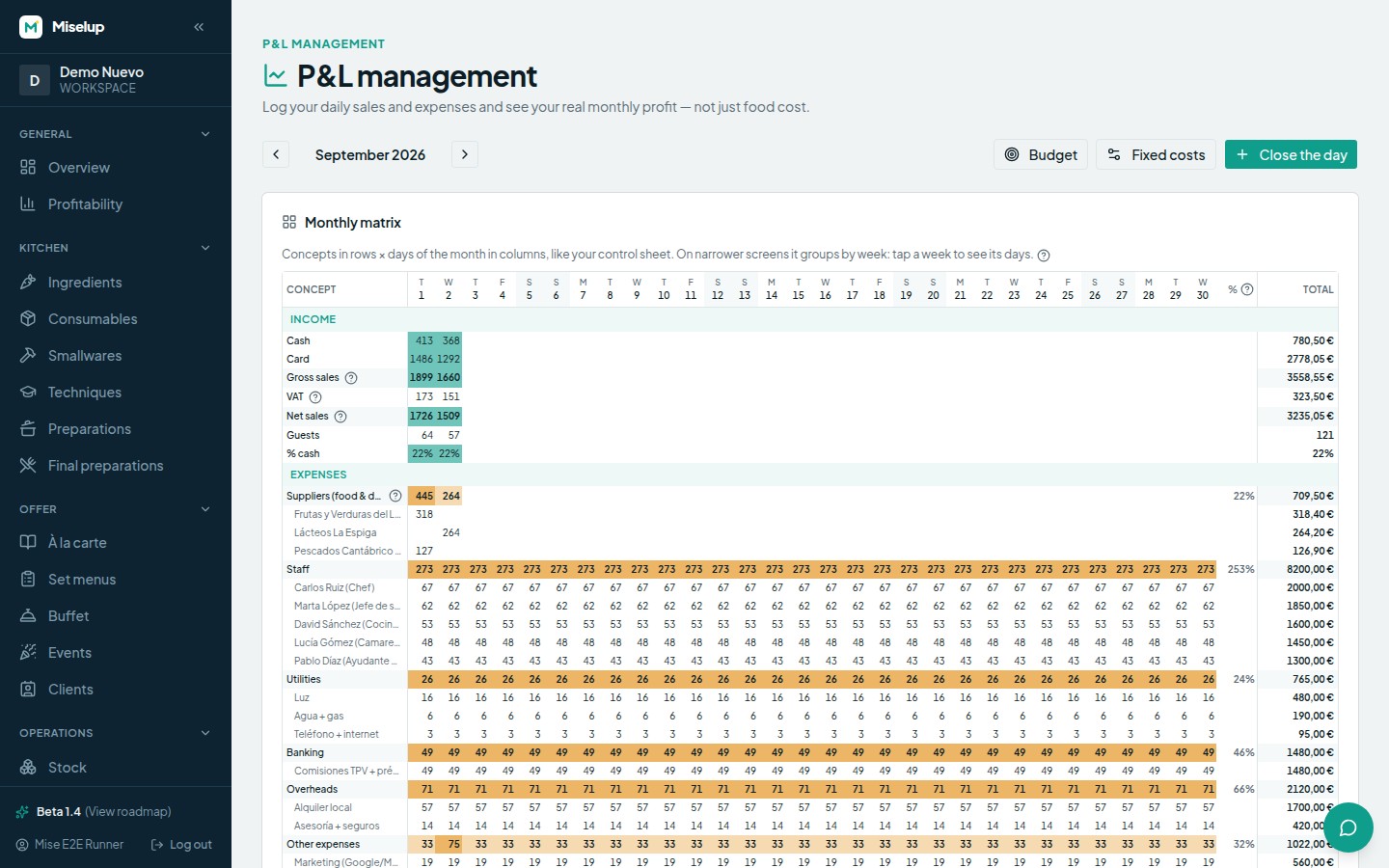
Every percentage in P&L management is over net sales (VAT excluded) and the profit is real: if it comes out negative, you’re losing money that month.
Known limits
- Sales go in gross. Miselup derives the net using the day’s tax or, if you haven’t set one, the organisation’s default tax. If none is declared, the P&L counts gross as net (see fixed costs and budget).
- The close form only distinguishes «Cash» and «Card» as ways of getting paid.
- «Close the day» only rewrites what you entered by hand: it doesn’t touch sales coming in from a POS, nor recurring or imported expenses.
- A new, empty day cannot be saved (the button stays disabled). A day that already had data, on the other hand, can be emptied: clear its amounts and save.
- Lines flagged «fixed» are prorated fixed costs and can’t be deleted from the month detail: they’re managed under «Fixed costs».
Was this article helpful?
Thanks! This helps us improve the help center.
Related articles
-
Fixed costs, opening days and your monthly budget
Enter your fixed costs and your budget: Miselup spreads them across the days you open and compares what you planned with what really happened.
-
The traffic light: reading the colors of your profitability
Green, amber or red: what each color means for food cost, margin and profit, and what to check every week.
-
Food cost and margin: the exact formulas
Where the cost per serving, the food cost %, the margin and the suggested price come from, and what each color is telling you.
Can't find what you're looking for?
Write to us and a real person from the team replies — no bots in the way when you need to talk.
Contact the team