The record book: reading it, printing it and correcting it
Everything logged in a period, with its verdict and its author. Filter by date, print it for the inspector, and correct it by voiding — never deleting.
Updated on October 19, 2026
What is the HACCP record book and what does it keep?
It’s the «Record book» screen, in the sidebar, under «HACCP» → «Records». It brings together three things: «Due today» (the checks that are already past their due time), the «Control points» from your plan and the «Records for the period».
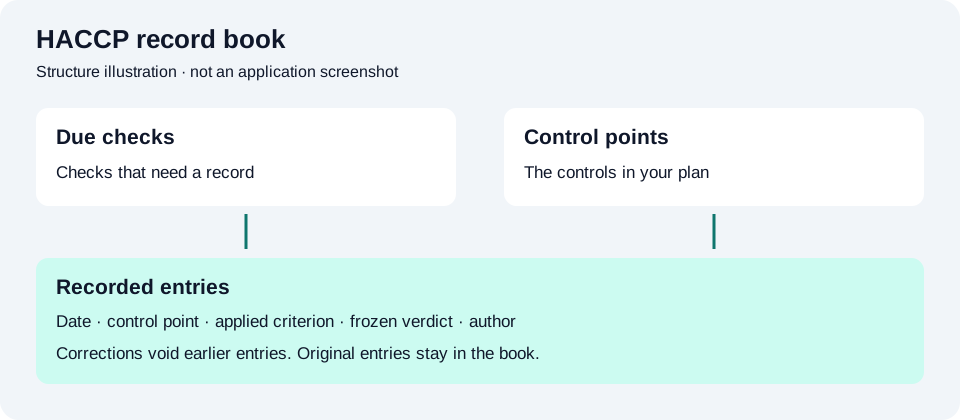
Every row in the book keeps the day, the control point, the record type, the verdict, the measured values, who logged it and the shift. The author is stamped by the system from the session of whoever writes it: it isn’t typed in and it can’t be changed afterwards.
What does each verdict in the HACCP book mean?
- «Conform» — the measurement falls inside the criterion in force at that moment. It’s the only verdict that proves conformity.
- «Deviation» — the measurement falls outside the criterion. It counts as an incident and calls for a corrective action.
- «No criterion» — the value was stored, but there was no criterion to judge it against: it proves nothing.
- «Not applicable» — the record doesn’t judge a measurement (an attached document, for example). It stands as evidence, with no traffic light.
- «Void entry» — a correction row for an earlier record.
The verdict is frozen when you save and is not recalculated afterwards, not even if you change the criterion: the document has to say what was judged on that day.
How are contact times without a unit shown?
New cleaning and disinfection records express contact time in minutes. Older records with no unit keep their value and print with a warning that no unit was recorded. They are not converted to minutes, and their historical verdict does not change. An older criterion without a unit needs a new version with an explicit unit before it can be used for new records.
How do I look up the book for a specific period?
- Go into «HACCP» → «Records».
- Under «Records for the period», set the dates in «From» and «To».
- If you have several sites, pick one under «Site» (or leave it on «All»).
- Press «Show».
You’ll see the period’s records with their tally of records, incidents, missing checks and voided entries. Watch out for one detail: voided incidents still count — voiding doesn’t clean up the tally.
How do I print the book for an inspection?
- Go to «HACCP» → «Temperatures» and press «View report & print».
- In the report, narrow the book’s period and press «Apply period».
- Pull the document with «Print / PDF»: it includes the manual sealed at signing, amendments and operational status, and the period’s book, with missing checks, explanations and voided entries. Earlier temperature-log readings are kept in their own block.
«Export book CSV» downloads the typed book for the period: one row per recorded value, with point and type, observation and recording dates, value and unit, applied criterion and citation, verdicts, author and role, corrective actions and voids. Separate rows include missing checks and their later explanations: explaining a gap does not turn it into a completed check. A failed or capped query is declared as an incomplete export in the CSV.
The file uses UTF-8 with a byte order mark. English exports use comma separators and decimal points; Spanish exports use semicolons and decimal commas. It does not invent missing historical units or criteria. «Export CSV» in the temperature section keeps the older temperature-log download. For the complete data and HACCP attachment files, see export your data.
Reading and printing your book does not depend on your subscription: it’s your food safety paperwork and it stays available in full even if you change plan.
How do I correct or void a record I got wrong?
In Miselup a HACCP record is never deleted: it’s voided, and the correction stays in plain sight.
- Find the record under «Records for the period» and press «Void».
- Pick a «Reason type» from the list (typed the value wrong, logged against the wrong unit or control point, probe faulty or badly placed, duplicate record, another reason).
- Write at least 15 characters in «Explain what happened» — telling what happened and what was done afterwards.
- Confirm with «Void record».
The record stays in the book struck through, and your name and your reason are printed in the report’s annex of voided entries. If what you voided was a deviation, it still counts as an incident.
Known limits
- 72-hour window: you can only void within the 72 h after the record was typed in. Past that, the right move is to log again today and explain it in the notes of the new record.
- Voiding quota: 3 per organisation every 24 hours, plus a quarterly ceiling proportional to your account’s volume of records — designed to fix the odd mistake, not to rewrite the book.
- A void cannot itself be voided, and only the account owner or an administrator can void.
- Very long periods get cut off: if the period has more rows than fit in a single query, the document warns that it isn’t complete. The workaround is to narrow it — a month or a quarter — and ask for it again.
Was this article helpful?
Thanks! This helps us improve the help center.
Related articles
-
Logging cold room and freezer temperatures
Type in the temperature, a badge tells you whether it's in range, and the reading is saved with its time and its author. From the team's phones too.
-
Adding equipment and control points
Add your cold rooms and freezers with their range, activate your food safety plan and set each point's criterion so the records actually prove something.
-
Email alerts: deviations and records that never happened
Understand HACCP email alerts, missing checks, recipients and the history of sends, retries and blocked communications.
-
HACCP manual editions and hazard analysis
How to change a HACCP manual you've already signed by creating a new edition, what gets copied and kept, and how to review the hazard analysis before signing again.
Can't find what you're looking for?
Write to us and a real person from the team replies — no bots in the way when you need to talk.
Contact the team