Stock, counts and inventory valuation
Control what you have in storage, what it is worth, where it is and what you need to reorder, with movements and counts that adjust stock to reality.
Updated on September 6, 2026
Where do I keep stock in Miselup?
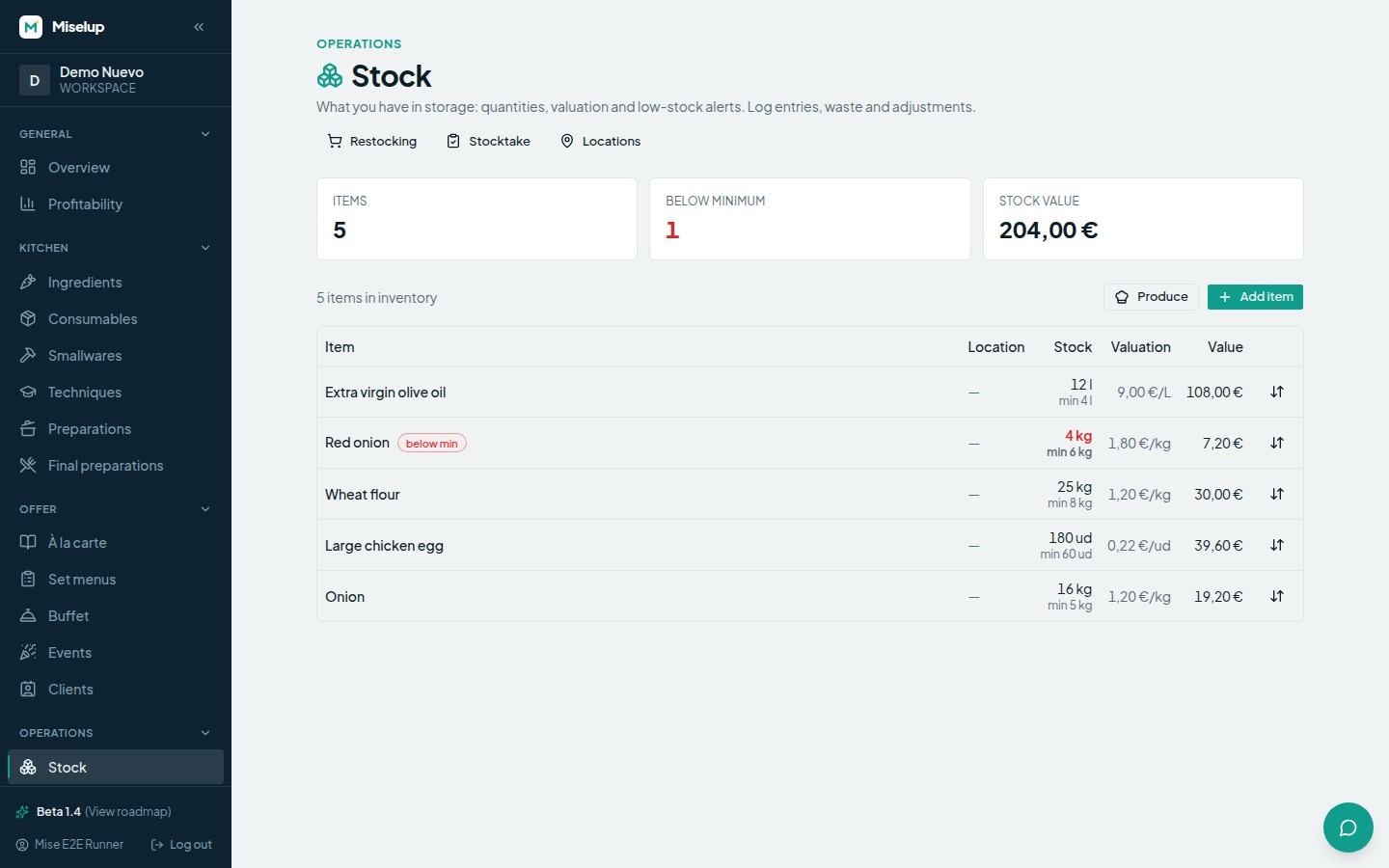
Under Operations → Stock. At the top you have three headline figures — «Items», «Below minimum» and «Stock value» — and the shortcuts to «Restocking», «Stocktake» and «Locations». The table lists each item with its location, its stock, its valuation and its value, and marks in red the ones that are «below min». If your plan doesn’t include inventory you will see «Inventory is available on the Mise Pro plan.» with «View plans»; compare plans at miselup.pro/en/pricing.
How do I add an item to inventory?
With «Add item» under Operations → Stock:
- Choose the type: «Ingredient», «Preparation» or «Consumable».
- Search for it by name in the selector.
- Set the «Stock unit» (the unit you count that item in).
- Give it a location, or leave it as «— no location —».
- Fill in «Minimum (optional)» and «Ideal (optional)»: these are the levels Miselup uses to warn you and to work out replenishment.
- Press «Add».
How do I log an entry, waste, consumption or an adjustment?
With the «Movement» button on the item’s row. Under «Type» you choose between «Entry (+)», «Consumption / usage (−)», «Waste (−)» and «Adjustment (set quantity)», and you fill in the quantity. You also get four optional fields: the unit cost, which updates the item’s valuation, plus «Lot (optional)», «Expiry (optional)» and «Reason (optional)» so you can leave a note of why.
How do I deduct what I use or what I sell?
With the «Consumption / usage (−)» type. It is the movement for whatever leaves the storeroom because you sold it, served it or used it up: it brings the stock down exactly like waste does, but it is logged separately so it doesn’t pollute your waste percentage. The rule is short: if the product was lost, it’s waste; if it was sold or used, it’s consumption.
You have two other routes, depending on how you work: closing a production order, which deducts the components of what you produce, and delivering a sales order with the lots you assigned deducted from stock.
Can I change or correct the stock by hand?
Yes, whenever you need to. If you got a quantity wrong on the way in, there is nothing to undo and no item to delete: use the «Adjustment (set quantity)» type, type the right quantity —the one actually on the shelf— and Miselup works out the difference, applies it and leaves it logged as a movement. To fix many items in one go, the comfortable route is the «Stocktake».
How is my inventory valuation calculated?
The «Stock value» is the sum of each item’s value, and each item’s value is its quantity times its valuation price. That valuation price works on Last Price: it is updated when you receive a purchase order with a price on the line (see receiving and lots) or when you log an entry with a «Unit cost».
How do I run a stocktake?
The stock count is about counting what is on the shelf and letting the system square the theoretical against the actual:
- Go to Operations → Stock and press «Stocktake».
- Filter by location if you are going cold room by cold room, or search for the item.
- Type the actual quantity of each item next to its «Theoretical». If they match, Miselup marks it as «matches».
- Look at the «Valued deviation»: it tells you in money what has been lost or gained, and it recalculates as you count.
- Write a «Count note (optional)» (for example, «month-end close»).
- Press «Close count».
When you close it, the theoretical stock is adjusted to the actual one and Miselup confirms how many adjustments it made and how many items were left unchanged. Lots reconcile themselves against the new balance.
What are storage locations for?
«Locations» are where you keep your stock. You create them with «New location», a «Name» and a «Climate»: «Ambient», «Refrigerated» or «Frozen». That climate is used in the counts and in expiry control, and it lets you count zone by zone instead of the whole storeroom in one go.
How do I know what I need to reorder?
With «Restocking», inside Operations → Stock: it shows you what is below its ideal level (or minimum) and how much is missing to restock it, with the cost estimated at Last Price. It comes split into two blocks: «Buy» (ingredients below level, which turn into an order from purchase orders) and «Produce» (preparations below level, which are produced from Stock). If nothing is missing, you will see «Everything is above its level.»
Known limits
- An item with no «Minimum» and no «Ideal» never shows up in Restocking: if you want Miselup to remind you, give it a level on its stock record.
- The count only adjusts the items you type an actual quantity for; the ones you leave blank stay as they were.
- When you produce a preparation from Stock, only the components that are held in inventory are deducted from stock.
- The «Upcoming expiries» warning is calculated on logged entries with an expiry date and doesn’t deduct consumption by lot (FEFO-lite).
- Accounts with the employee role don’t close counts or log movements.
Was this article helpful?
Thanks! This helps us improve the help center.
Related articles
-
Purchase orders to suppliers
Build the order from what you are actually short of, adjust quantities and prices, and take it from draft to received without losing anything.
-
Receiving an order and working with lots
When you receive an order, Miselup adds the stock, creates the lot for what came in and updates that supplier's price.
-
Suppliers and their purchase prices
Add who sells to you, keep their prices by format, and see at a glance which supplier works out cheapest.
Can't find what you're looking for?
Write to us and a real person from the team replies — no bots in the way when you need to talk.
Contact the team