What you can ask Mise Agent
Mise is the AI consultant inside your dashboard: it reads your costings, your P&L and your inventory before answering, and shows you what it checked.
Updated on October 13, 2026
What is Mise Agent and where do I find it?
Mise Agent is the AI agent that lives inside Miselup, in the «AI for your business» → «Mise Agent» menu group. It is your business consultant: before answering it reads your costings, your P&L, your inventory and your purchases. There is nothing to explain to it and no data to paste in.
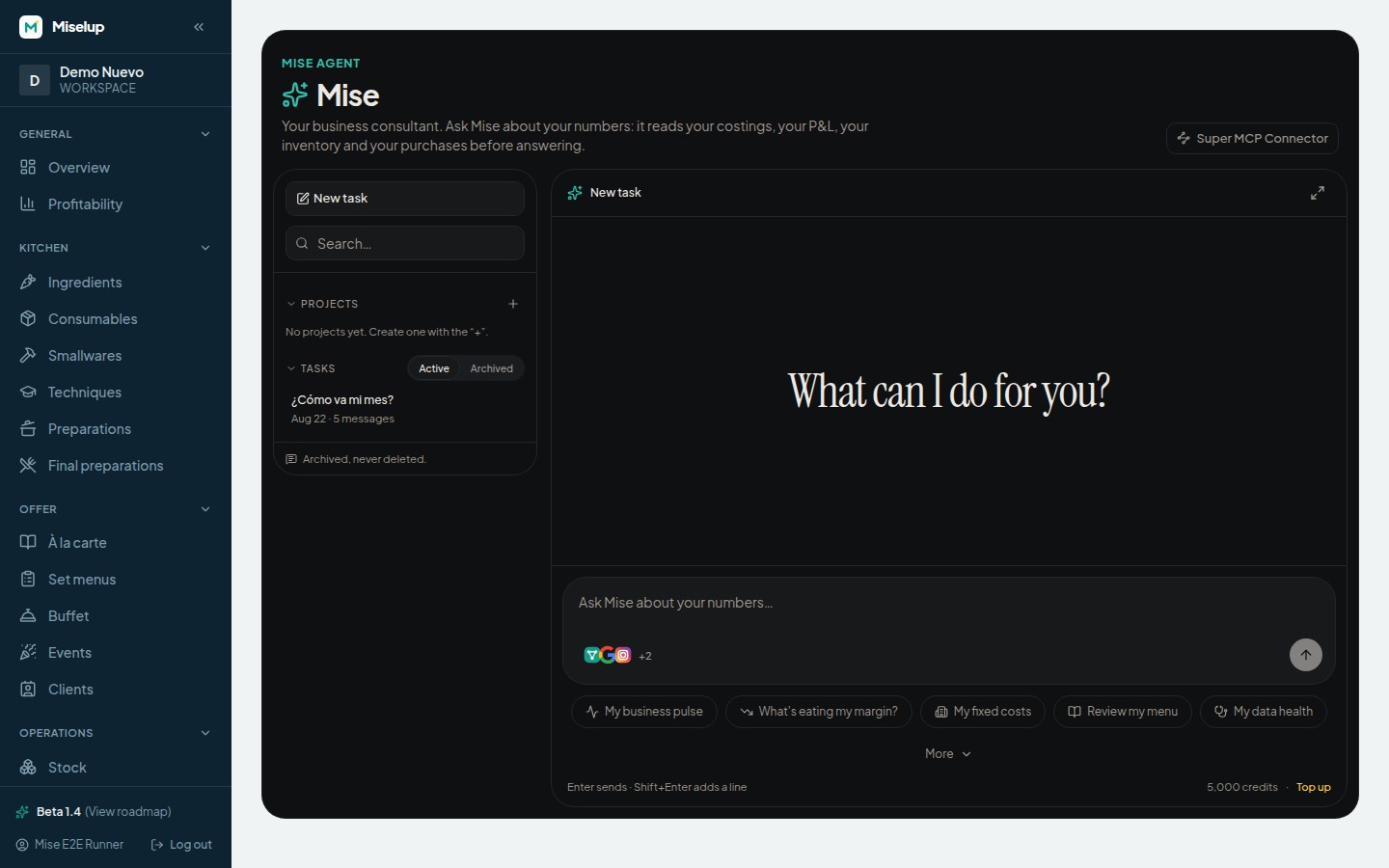
What can I ask Mise?
In plain language, the way you would ask a business partner. The welcome screen offers five quick actions with prepared requests:
- «My business pulse» — How the month is going: sales, costs and margin from what you’ve logged.
- «What’s eating my margin?» — What you sell, ranked by profitability, with its food cost.
- «My fixed costs» — What it costs you to open each month, with the subtotals per block.
- «Review my menu» — What’s on your menu, at what price, and where the margin is falling short.
- «My data health» — What your account is missing for the numbers to be trustworthy: stale prices, half-finished costings, days left unclosed.
Press «More» to open the «What Mise can do» gallery and see the requests with their descriptions. The «Market research with sources» card is marked «Coming soon»: it isn’t available yet.
Does Mise make figures up?
No. Every number it gives you comes from a query against your data, using the same functions that paint that figure on Miselup’s screens. The model interprets and writes; it doesn’t do the maths. If a piece of data doesn’t exist, Mise says so instead of filling it in.
How do I check where a number came from?
At the foot of every Mise Agent answer there is the «See what I checked» dropdown: it shows you what it looked at to reach that answer, so you can cross-check it against the screen you already know. While it is answering, it also tells you what it is looking up.
How do I organize my conversations with Mise?
Every conversation with Mise Agent is saved as a task, with its own title and its own search. In the left-hand column you have four sections: «Pinned», «Projects», «Tasks» and «Results».
- Start a new one with «New task».
- Group whatever repeats into a project: press the «+» in «Projects» and give it a name.
- Choose who sees it: «Organization-wide» shows up in your whole team’s list; «Personal», only in yours.
- Move a task into a project from its menu, with «Move to…».
- Keep what you check daily at the top with «Pin», or for the whole brigade with «Pin for the whole team».
Whatever you stop using gets archived (the «Active» and «Archived» filters): it is archived, never deleted.
Can Mise change or delete data in my account?
Mise can propose ingredient, supplier and supplier-price creations or changes. Review the proposal and confirm with the card’s button: that click executes the change with your permissions. The model does not write directly or offer deletions. It does not create recipes.
It can also read HACCP according to your permissions and plan. Review food-safety data in its screens. A response does not independently sign a manual or record a measurement.
Which plans include Mise Agent?
Mise comes with your subscription, with a monthly credit allowance that depends on your plan. If yours doesn’t include it, the screen tells you and offers to upgrade — the plans are at miselup.pro/en/pricing/. Every message uses credits: how they work and how to top them up is in /en/help/mise-credits/.
To analyze a document and check its calculations, read Mise attachment formats and limits and its calculator.
Known limits
- A message can be up to 4,000 characters. If you have a lot of text to paste in, split it across two messages.
- The list shows the 100 most recent conversations. Use the search box in the left-hand column to reach older ones.
- In a very long conversation only the 200 most recent messages are shown. When a thread drags on, open a new task for the next topic.
- A maximum of 50 projects per organization, and each name can’t be longer than 60 characters.
- Mise doesn’t run on an account that support has entered to help you: conversations are each business’s private content.
- Mise doesn’t create recipes. It is a business agent: costs, margins, inventory and results. To bring recipes into Miselup there is the AI Importer, at /en/help/import-recipes-with-ai/.
Was this article helpful?
Thanks! This helps us improve the help center.
Related articles
-
Mise credits: what they are and how to top up
Every message to Mise costs 10 credits. Your plan grants a fresh allowance each month and, if it runs out, you top up from €5 without leaving the chat.
-
Connecting Claude or ChatGPT to your data with the Super MCP Connector
Connect Claude or ChatGPT to your Miselup data: costings, P&L and inventory according to your plan and permissions. No manual exports.
-
The traffic light: reading the colors of your profitability
Green, amber or red: what each color means for food cost, margin and profit, and what to check every week.
-
Mise attachments and calculator: analyze and check
Attach images, PDF, DOCX, XLSX, CSV, MD or TXT to Mise. Check the limits and how its calculator operates on business figures.
Can't find what you're looking for?
Write to us and a real person from the team replies — no bots in the way when you need to talk.
Contact the team